How to Connect Brokers and Platforms
Category: App Pages | Last updated: 2026-06-15 | Reading time: 8 min read
What Is the Connections Page?
The Connections page is where you link your broker accounts to Signal Trade App. Every account you add can be used as a leader, a follower, or both. The page also shows live connection status and lets you reconnect or delete accounts.
Supported Platforms
| Platform | Best For | Connection Type |
|---|---|---|
| Tradovate | Take Profit Trader, MyFundedFutures, Tradeify, LucidTrading | Username / Password / API Key |
| NinjaTrader + Rithmic | Apex Trader Funding, Bulenox, Earn2Trade | Rithmic credentials |
| TradingView | Pine Script alerts and webhook signals | Webhook URL + API key |
Step 1: Add a Tradovate Account
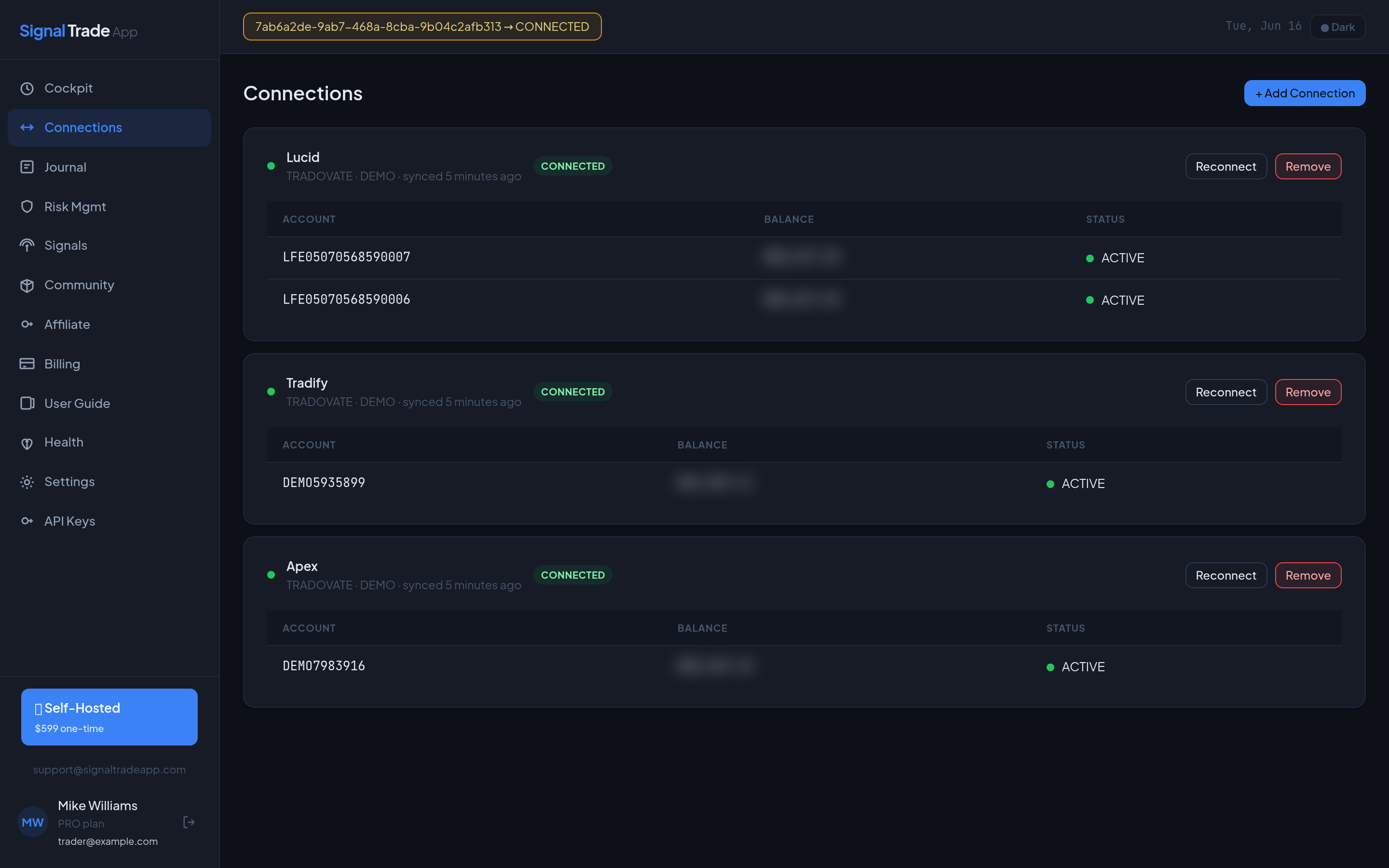
- Go to Connections and click Add Connection.
- Select Tradovate as the broker.
- Enter a friendly name, your Tradovate username, password, and optional API key.
- Click Save & Test. A green badge means the account is ready.
Step 2: Add a Rithmic / NinjaTrader Account
- Select Rithmic from the broker list.
- Enter your Rithmic username, password, and selected server (e.g., Rithmic Paper or Rithmic Live).
- If you use NinjaTrader, make sure it is connected to Rithmic and accepting orders.
- Test the connection. Rithmic connections may take 10-30 seconds to authenticate.
Step 3: Add a TradingView Webhook
- In Signal Trade App, create a new TradingView connection.
- Copy the webhook URL and your API key.
- Open TradingView alert settings and paste the webhook URL.
- Format your alert message as JSON with symbol, side, quantity, and order type.
- Save the alert and test with a paper account first.
Connection Status Meanings
| Status | Meaning | Action |
|---|---|---|
| CONNECTED | Account is live and ready. | None — start copying. |
| CONNECTING | Authentication in progress. | Wait up to 30 seconds. |
| DISCONNECTED | Session lost or credentials invalid. | Check credentials and reconnect. |
| LOCKED | Risk limit triggered. | Review risk settings or journal. |
Troubleshooting
- Credentials rejected: Log into the broker directly to confirm the password is correct.
- Two-factor auth: Some brokers require disabling 2FA or using an API key.
- Duplicate login: Logging into the same account elsewhere may disconnect Signal Trade App.
- Rithmic timeout: Rithmic servers can be slow during market open. Retry after 60 seconds.
Read next: Cockpit guide.
Start Copy Trading Free
Signal Trade App lets you copy one trade across unlimited futures accounts in under 50ms. Sign up free with a 5-day Pro trial (credit card required, no charge during trial).