Copy Trades Across All Your Futures Accounts in Under 50ms
The fastest futures trade copier for prop firm traders. Connect your Tradovate, NinjaTrader, and TradingView accounts, create copy groups, and execute trades across unlimited accounts simultaneously — with built-in risk management and real-time sync.
How It Works
- Connect your accounts — Link your leader account and follower accounts from Tradovate, NinjaTrader, or Rithmic in under two minutes.
- Create a copy group — Set custom copy ratios per follower, configure daily loss limits, and define profit targets.
- Trade your leader — Place orders normally on your leader account. Every fill is instantly replicated to all followers.
- Monitor everything — Track open positions, P&L, and risk status across all accounts from a single dashboard.
Quick Order Entry for Multiple Accounts
Place orders across all your prop firm accounts from one panel — no complex group setup and no platform switching. See how Quick Order Entry works.
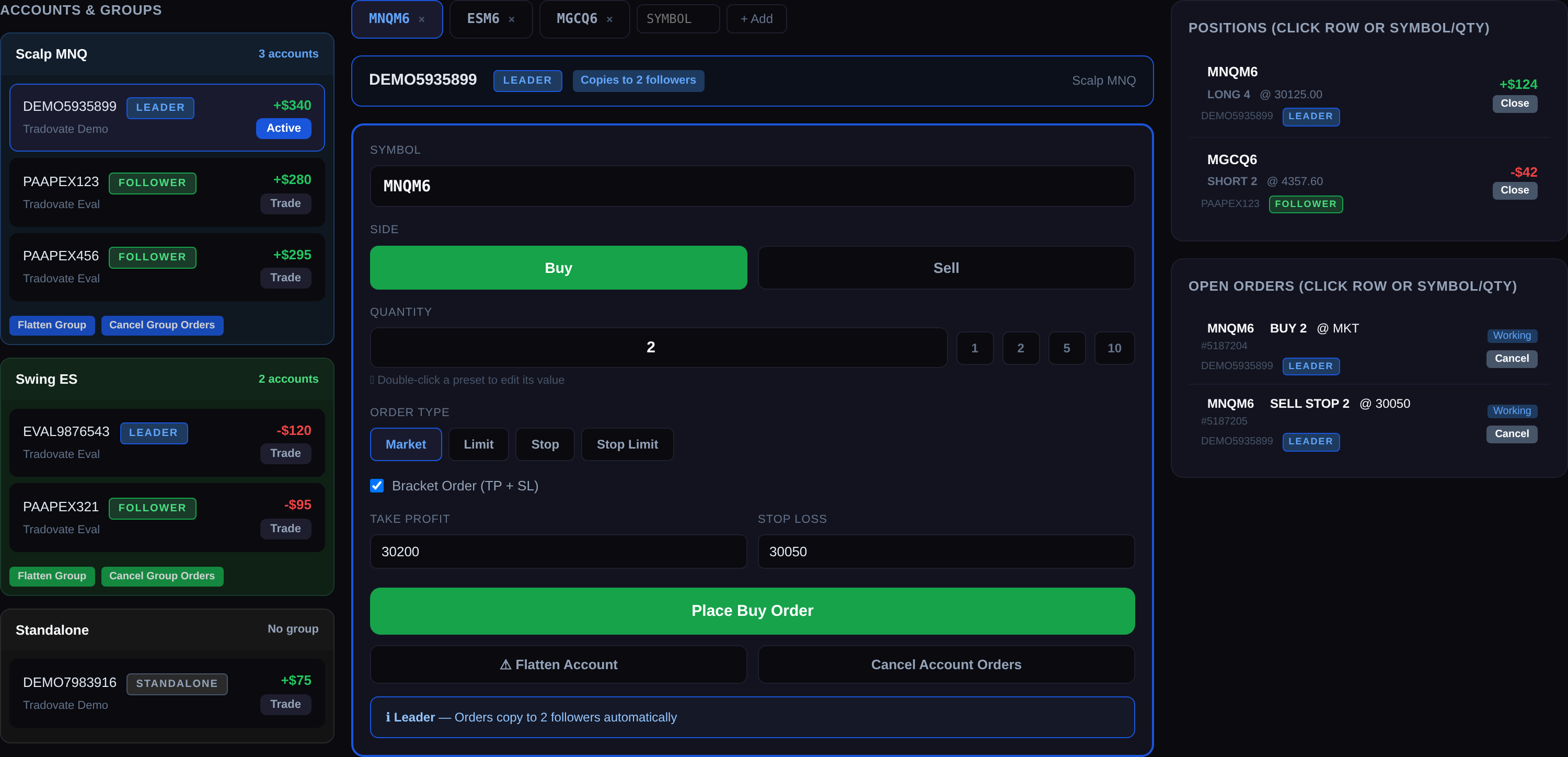
- Select any account from your grouped sidebar and trade it directly.
- Trade a leader to copy to all followers, or trade an individual account on its own.
- Market, limit, stop, and bracket orders with custom per-symbol quantity presets.
- Works with Tradovate, Rithmic, and NinjaTrader — a simpler alternative to complex Tradovate group trading.
Free Live Futures Scanner and Chart Alerts
Fair value gaps, order blocks and liquidity sweeps across 16 futures markets, free to watch and free to set alerts on.
- Free live scanner: fair value gaps, inverse FVGs, order blocks, breaker blocks, CRT, liquidity sweeps and Fibonacci/OTE retracements on the 1 minute to 4 hour charts
- Set up free alerts by email or Discord with any Signal Trade App account, no Pro plan needed
- Smart-money tools on the chart: draw and review FVG and IFVG zones on the charting page
- Closed candles only, so a detection is never withdrawn afterwards
Open the free scanner. Start with a pattern: Fair value gap scanner, Inverse FVG (IFVG) scanner, Order block scanner.
Who Signal Trade App Is For
- Prop firm traders managing multiple funded accounts at Apex, Take Profit Trader, Lucid, or MyFundedFutures.
- Multi-account traders who want to copy trades across personal, eval, and funded accounts simultaneously.
- Automation seekers using TradingView Pine Script strategies who want hands-free execution via webhooks.
- Privacy-focused traders who prefer a self-hosted trade copier with full control over their data.
Why Traders Choose Signal Trade App
- 5-day Pro trial — Test all Pro features with a credit card (no charge during trial).
- Cross-platform copying — The only copier that copies from NinjaTrader to Tradovate natively in one group.
- Built-in risk controls — Daily loss limits, trailing drawdown, and auto-lockout protect every account.
- Auto-importing journal — All trades synced with Sharpe ratio, profit factor, win rate, and expectancy.
- Self-hosted option — $599 one-time. No subscription. Full source code. Docker deployment.
Supported Brokers & Prop Firms
- Tradovate — Take Profit Trader, MyFundedFutures, Tradeify, and LucidTrading
- NinjaTrader / Rithmic — Apex Trader Funding, Bulenox, and Earn2Trade
- TradingView — webhook alerts and Pine Script automation
Pricing
- Pro — 5 days free, then $30 the first month and $15/month after. A credit card is required, and you are not charged until the trial ends. Unlimited broker accounts; orders reach Tradovate in under 50ms and Rithmic in under 5ms.
- Self-Hosted — $599 one-time — full source code, Docker deployment
What Traders Say
“I came across Signal Trade App while looking for a reliable webhook provider for my trading automation project, and it turned out to be exactly the tool I needed. […] It not only handles webhook-based trade execution, but also provides the flexibility and API functionality needed to build much more complex automation systems on top of it. […] I contacted the team with a request for additional API functionality, and the feature was implemented and documented the very next day. That level of responsiveness is exceptional.”
Wladimir, DE — rated 5 out of 5
“Great customer service. Helped me automate my trades easily. The dashboard is very easy to use and connect.”
Tzach B., IL — rated 5 out of 5
Reviews published on Trustpilot.
Frequently Asked Questions
What brokers and prop firms are supported?
We support Tradovate and Rithmic accounts, including NinjaTrader accounts that run on them. That covers prop firms such as Apex Trader Funding, Take Profit Trader, Lucid Trading and MyFundedFutures. We do not connect to Topstep’s TopstepX (ProjectX) platform. If your eval or funded account runs on Tradovate or Rithmic, you can copy across it.
How many accounts can I trade at once?
There is no hard limit. Pro plans let you copy one trade to unlimited follower accounts simultaneously. Many of our users scale across 10+ prop firm eval and funded accounts every day.
Can I set different sizes per account?
Yes. Each follower has its own copy ratio, so you can scale contract size up or down per account — useful when mixing eval and funded accounts, or accounts with different balances and risk limits.
Is there a free trial?
Every new account starts with a 5-day free trial of all Pro features. A credit card is required to start, but you are not charged until the trial ends, and you can cancel anytime. After the trial, plans start at $30 for the first month, then $15/month for unlimited accounts. A $599 self-hosted lifetime license is also available.
Is copy trading allowed by my prop firm?
Copying between your own accounts is legal and permitted by most prop firms. Always check your specific firm's terms of service before running a copy group.
What futures instruments can I trade and copy?
Signal Trade App supports all CME and CBOT futures including NQ, MNQ, ES, MES, YM, MYM, RTY, M2K, GC, MGC, CL, NG, ZB, and more. As long as your broker offers the symbol, our copier can replicate it across all connected accounts.
What is copy trading?
Copy trading automatically replicates trades from a leader account to follower accounts. When your leader trade fills, followers execute the same trade instantly.
Does it work on Windows, Mac, and mobile devices?
Absolutely. Signal Trade App is a cloud-based web app that runs on any device with a browser — Windows, macOS, Linux, iOS, and Android. There is nothing to download, install, or maintain. You can monitor positions and copy trades from your phone, tablet, or laptop anywhere in the world.
Can I use TradingView with Signal Trade App?
Yes. You can send TradingView alerts to Signal Trade App via webhook. When your Pine Script strategy or alert fires, we receive the signal and instantly copy the trade to all connected accounts — including Tradovate, NinjaTrader, and prop firm accounts.
How do trading signals get copied to my accounts?
Trades are copied via secure WebSocket connections directly to your broker APIs. When your leader account fills an order, our cloud infrastructure relays the exact signal to every follower account within milliseconds. Bracket orders, stops, and targets are preserved automatically.
How fast are trades copied?
Most trades copy in under 50ms via WebSocket — that's <2ms broker ping + processing. Exact latency depends on your broker's API response time.
What technology powers Signal Trade App?
Our platform is built on a modern cloud-native stack with real-time WebSocket streaming, auto-scaling infrastructure, and AES-256 encryption. Orders are relayed through low-latency edge nodes to ensure the fastest possible execution across all your accounts.
How does Signal Trade App compare to other trade copiers?
Unlike desktop-only copiers that require your PC to stay on, Signal Trade App is fully cloud-based — so trades copy even when your computer is off. We also include built-in risk management, a trading journal, TradingView webhooks, and prop firm support out of the box, replacing multiple tools with one.
Do I need to leave my computer on for trades to copy?
No. Because Signal Trade App runs in the cloud, your copy groups and risk guards operate 24/7 without your local machine. This means you never miss a trade, even if you lose internet, close your laptop, or step away.
Can I copy bracket orders and stop-losses?
Yes. Market orders, limit orders, stop orders, and full bracket orders (take-profit + stop-loss) are all supported and copied precisely to every follower account.
Is my account login information secure?
Yes. Broker credentials are encrypted at rest using AES-256 and are never logged or exposed. We only store the minimum required to maintain your connection and we never share your data with third parties.
What are AI-assisted strategies?
Coming soon — Signal Trade App's AI strategy engine will let you create automated trading conditions using price, SMA, or RSI indicators. Strategies will be evaluated every 30 seconds and can trigger orders automatically when conditions are met.
Can I connect Claude or Cursor to Signal Trade App?
Coming soon — we are building integrations for AI assistants to place orders and manage strategies via natural language.
Popular Trade Copier Pages
- Apex Trade Copier — Scale across Apex Trader Funding eval and funded accounts
- Topstep Copy Trading Rules — What Topstep allows, and why Signal Trade App does not connect to TopstepX
- Tradeify Trade Copier — Copy trades across every Tradeify account
- Lucidtrading Trade Copier — Real-time sync for Lucidtrading accounts
- Tradovate Trade Copier — Copy trades across all Tradovate-based prop firms
- NinjaTrader Trade Copier — Copy from NinjaTrader to Tradovate and Rithmic
- TradingView Futures Automation — Turn Pine Script alerts into live futures orders
- Trading Copier Software — Cloud and self-hosted copier software for futures
- Topstep Alternative — Alternatives to Topstep and TopstepX for futures traders
Compare Trade Copiers
- Best trade copiers for futures in 2026 — every major copier compared side by side
- Trade copier pricing compared — which futures copier is cheapest
- TradeSyncer alternatives — unlimited accounts at $15/month
- TradeCopia alternatives — cloud-native copying at a fraction of the cost
- Traders Connect alternatives — built for futures, not MT4/MT5 forex
User Guide
New to Signal Trade App? Visit the step-by-step user guide for tutorials on every page, from signup to advanced copy-group setup.
Start Your 5-Day Free Trial
Create your account in under 60 seconds. A credit card is required for the 5-day Pro trial, but you are not charged until the trial ends. Connect your first broker and start copying trades today.