
Cloud Trade Copier for Futures: Why Cloud > Desktop
Category: Platforms | Date: 2026-06-21
The Two Copier Architectures: Cloud vs Desktop
When you pick a trade copier, you are really picking an architecture. Either the copier runs in the cloud (on hosted servers you never touch) or on your desktop/VPS (a server you manage or rent).
Cloud-based copiers like Signal Trade App run on redundant cloud infrastructure 24/7. Desktop-based copiers like Tradecopia or TradingSim run on a Windows PC in your office or a rented VPS. Each has trade-offs.
Uptime: 99.9% Cloud Guarantee vs Power Outage Risk
Cloud copiers promise 99.9% uptime (about 44 minutes of downtime per month). They run on multiple data centers with automatic failover. If one server goes down, another takes over instantly. You never manually restart anything.
Desktop copiers depend on your hardware. Lose power? Your copier stops immediately. Your ISP goes out? Trades stop copying. A system crash at 2 AM? No one is there to restart it. Unless you run a desktop copier on a dedicated VPS, you are betting your funded account on your home internet.
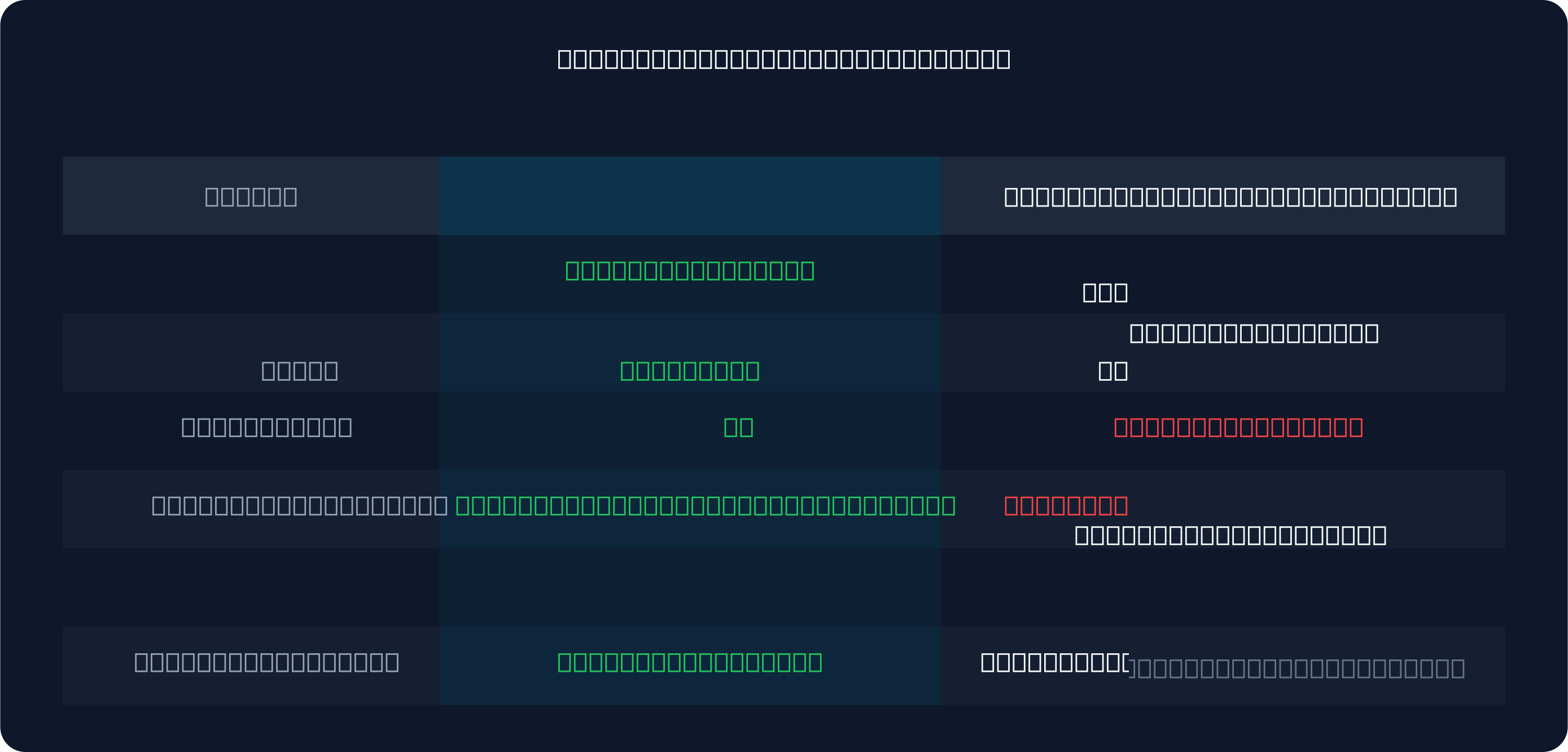
Setup Complexity: 5 Minutes Cloud vs 30+ Minutes Desktop
Signal Trade App (cloud) takes 5 minutes: connect your broker account (via API key or OAuth), create a copy group, add followers, and go live.
Desktop copiers require:
- Buy or rent a Windows VPS ($10–$20/month)
- Download and install the copier software
- Configure your broker connections
- Set up RDP access so you can monitor remotely
- Keep Windows, antivirus, and the copier software updated
- Monitor the VPS for crashes and memory leaks
- 30–60 minute first-time setup, then ongoing maintenance
If something breaks, you have to troubleshoot it yourself. Cloud copiers have a support team standing by.
The Hidden Costs: VPS + Electricity + Hardware
Pricing is not just the copier subscription. With desktop-based copiers, you add:
- VPS rental: $10–$20/month ($120–$240/year)
- Electricity (if running on-premise): $5–$10/month
- Hardware depreciation: Every 3–5 years buy a new PC ($500–$2,000)
- Backup VPS for redundancy: Another $15–$20/month
Signal Trade App at $30 first month, $15/month after, costs less over a year than a single VPS.
Power Outage Risk: Cloud Continues, Desktop Stops
You are down 50 ticks on ES. Your stop loss is at +30 ticks. You have a 30-minute window to fix this.
Cloud copier: Your account is connected via the internet. Even if your power goes out, the cloud server keeps copying. Your stop loss triggers on schedule. You lose 50 ticks but the framework stays intact.
Desktop copier: Your PC goes down. The copier stops. You scramble to restart, reconnect, and clear orders. By the time you are back online, the stop has not triggered and the loss is now 75 ticks. Worse: some desktop copiers lose pending orders on crash, forcing manual reentry.
Mobile Access: Cloud = Check Status Anywhere, Desktop = PC Only
With a cloud copier, you have a web dashboard. Open it on your phone, laptop, or tablet. See all your copy groups, followers, and P&L in real-time. Pause copying if you need to. Run a position size test without touching your PC.
Desktop copiers do not have mobile dashboards. You need RDP or VPN into your PC. That means you cannot easily check status from an airport, coffee shop, or your phone.
Latency: Cloud <41ms per Account, Desktop 50–200ms
Latency is how fast a trade from your leader account reaches your followers. Cloud copiers using persistent WebSocket connections achieve <41ms latency per account on average.
Desktop copiers polling a desktop PC over the internet typically see 50–200ms latency, especially with multiple followers. The more accounts you copy to, the slower each one gets.
Why Cloud Wins for Scaling: 50+ Accounts Without Overhead
If you are running 20 accounts at Apex, Lucid Trading and MyFundedFutures, a desktop copier becomes a bottleneck. Each new follower adds overhead — more polling, slower execution, more CPU usage.
A cloud copier scales without friction. Add 20 followers, 50 followers, 100 followers. The cloud backend is already built to handle it. Your latency stays sub-50ms regardless of follower count.
Desktop copiers are built for small-scale copying (2–5 accounts). Beyond that, they struggle.
Which Architecture Should You Choose?
Choose cloud if:
- You want zero setup complexity
- You trade from multiple locations (office, home, travel)
- You want mobile access to your copy groups
- You are copying to 5+ followers
- You want 99.9% uptime guarantee
Choose desktop only if:
- You are running 1–2 followers maximum
- You want the lowest latency and do not mind hardware management
- You refuse to use cloud services (data sovereignty reason)
- You already run a VPS for trading and want to co-locate your copier there
Try Cloud Copier Risk-Free
Signal Trade App offers a 5-day free trial of cloud copy trading. Test the mobile dashboard, the latency, the ease of use. No charge until your trial ends. Then decide if cloud is for you.
After the trial, pricing is $30 for the first month, then $15/month for unlimited accounts. That is cheaper than a single VPS over a year.
Start your free 5-day trial today and experience cloud-based copy trading.
Frequently Asked Questions
Is cloud really more reliable than desktop?
Yes. Cloud copiers run on redundant servers with automatic failover — 99.9% uptime. Desktop copiers depend on your hardware, internet, and system stability. A power outage kills desktop instantly; cloud keeps working.
What happens if cloud goes down?
Signal Trade App maintains 99.9% uptime with redundant data centers. If one data center fails, others take over automatically. Your copy groups stay active without manual intervention. Worst case: 44 minutes of downtime per month.
Do I need a VPS for cloud copiers?
No. Cloud copiers run entirely on hosted servers. You do not need any hardware, VPS, or desktop software. Log in from your phone, laptop, or anywhere with internet.
Is my data safe on a cloud platform?
Signal Trade App uses industry-standard encryption (TLS 1.3), secure authentication, and does not store your broker API keys unencrypted. Your trade data and account details are protected by the same standards as banking platforms.
Start Copy Trading Free
Signal Trade App lets you copy one trade across unlimited prop firm accounts in under 50ms. Sign up free with a 5-day Pro trial (credit card required, no charge during trial).
Related Reading
- Help Center — Setup guides, broker connections, and risk management
- Supported Platforms — Tradovate, NinjaTrader, TradingView, and more
- Blog — More guides on copy trading, prop firms, and futures automation